AI Keyword Suggestions
New: Octuno automatically suggests matching keywords – based on a product description or a competitor source.
How it works
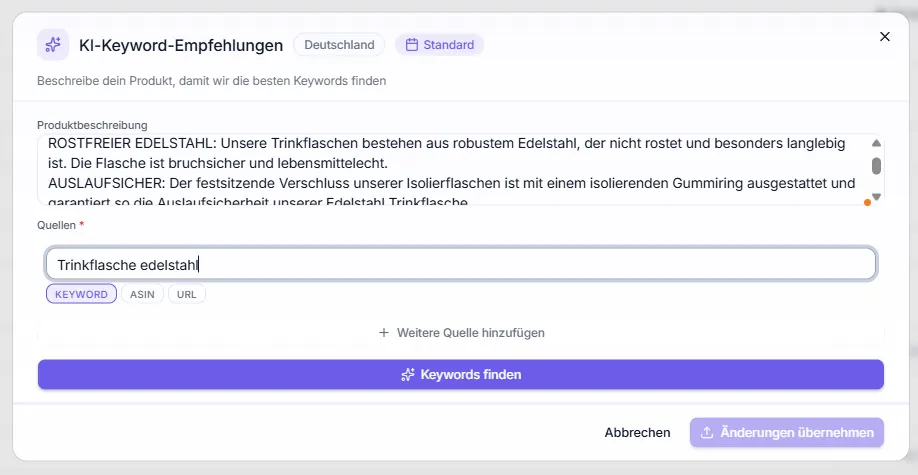
In the keyword panel of the editor you'll find the purple "✨ Keyword Suggestions" button. A click opens a modal.
Modal inputs
Subtitle: "Describe your product so we can find the best keywords"
- Sources * (required field) – at least one source is needed, otherwise "Find keywords" stays disabled. Three tabs:
- KEYWORD – a seed term the AI should expand
- ASIN – competitor product to derive from
- URL – any Amazon URL as a source
- Product description (optional) – additional context the AI derives from
Accept suggestions
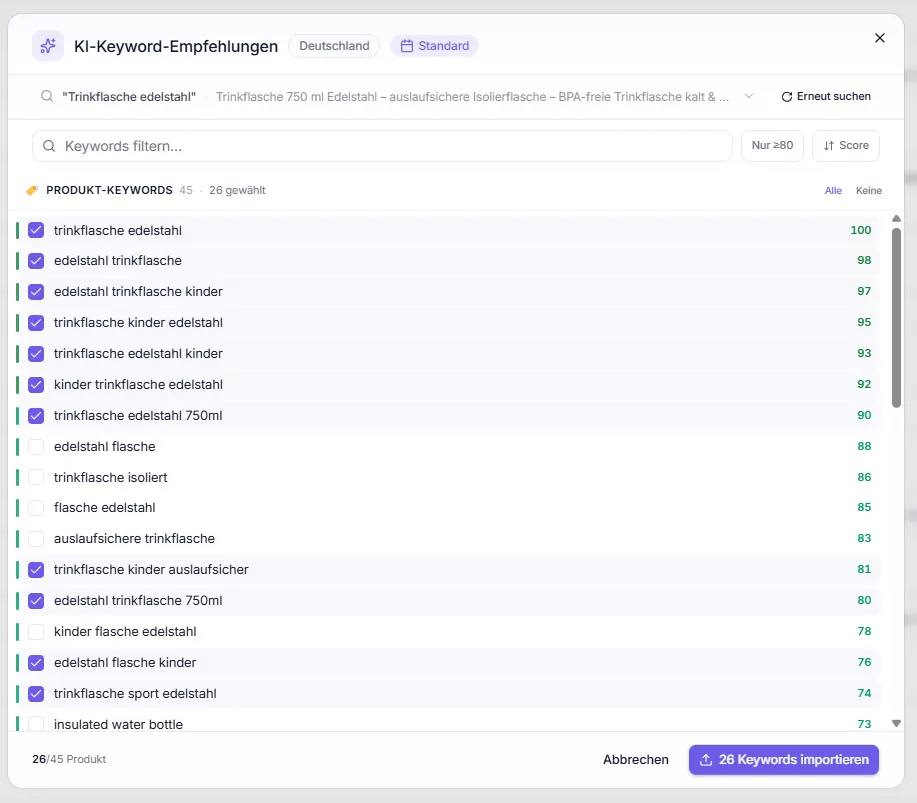
The "Find keywords" button generates the suggestions – each with keyword and score, sorted by relevance. In the result list you can:
- search the list via the "Filter keywords…" field,
- show only highly relevant keywords with the "Only ≥80" toggle,
- sort by score and select/deselect individual suggestions (or All / None),
- combine several seed keywords, ASINs or URLs with "Add another source".
The "Import X keywords" button adds the selected suggestions to the keyword panel. With Cancel or Close you discard without importing.
Tip: The suggestions cost AI points. See Plan & Billing for exact cost.